Momo
A Windows desktop app that turns screenshot QA into a finished report.
ROLE
Product designer & prototype developer
RESPONSIBILITIES
Product strategy, UX architecture, interaction design, prototyping, design system and reporting workflow
TOOLS USED
Electron · JavaScript · Canvas · IndexedDB · pptxgenjs · Figma · electron-builder
overview
Momo is a desktop QA tool designed to simplify screenshot-based testing and reporting. It captures lossless PNG screenshots, lets testers annotate issues and add structured notes, and organizes evidence by project, link and issue type. Momo can generate a single PowerPoint containing multiple project sections or create separate reports for categories such as Linguistic, Formatting, Functional, Media and English Bleed.
the problem
Screenshot-based QA evidence was scattered across captures, notes, project links and issue categories. Turning that material into a clear client-ready report created repetitive work and made consistency difficult across projects.
the solution
Momo brings capture, lossless PNG evidence, annotation and structured notes into one desktop workflow. Testers can organize issues by project and category, then export either one consolidated PowerPoint or separate reports by issue type.
My Process
Momo was built backwards from the deliverable. The report the client receives was designed first, and every screen exists to make that report a by-product of reviewing rather than a second job afterwards. It is a working Windows application in daily use, not a prototype.
01
Action Map

Mapped from the failure, not from the feature list. The target outcome is traced to three places the old workflow broke, and each one is answered by a single decision in the tool.
02
Storyboard

The loop a tester repeats once per finding, then the one decision that shapes the deliverable. The same set of findings becomes one deck, a deck per page, or a file per issue type — chosen at export, never at capture.
03
Style Guide

Two themes from one token set, with a deliberate exception: the red and green annotation marks are fixed in both, because they are drawn into the exported PNG and two reports made on the same day must not disagree.
04
Wireframes

Desktop only, at 1440 × 900. Three zones that never move — projects left, evidence centre, description right — so the tester learns one map and keeps it. There is no mobile frame because Momo captures the machine it runs on.
05
Development
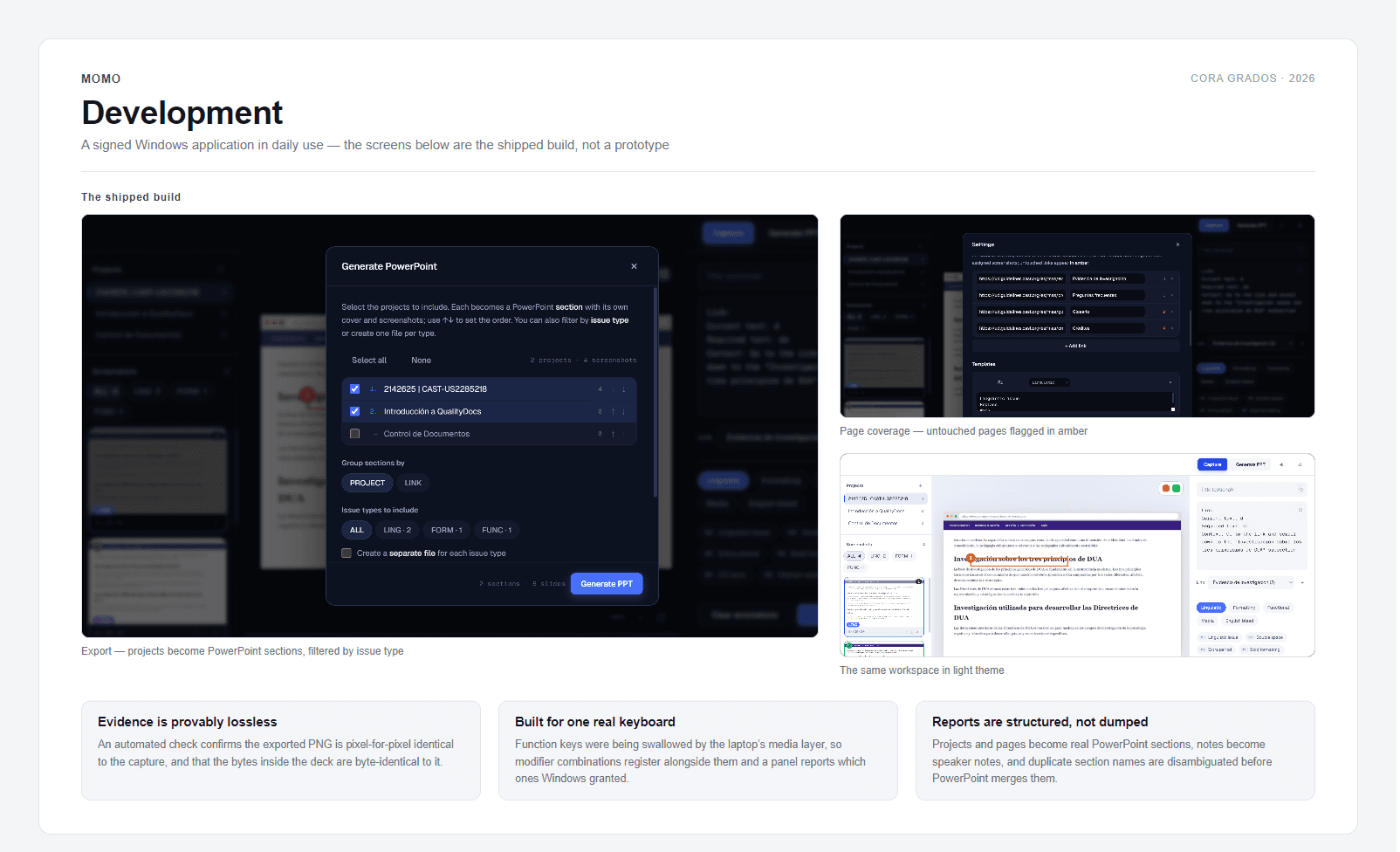
Built as an Electron desktop application: the main process owns screen capture, global shortcuts and PowerPoint output, while the renderer holds the canvas, the project and page model, and the note templates. It ships as a one-click Windows installer that replaces the previous version in place and keeps the user data, and it runs entirely offline — no account, no server, no telemetry.
06
Evaluation Plan
Momo is in production use on live localisation QA work, which replaces a hypothetical evaluation plan with real numbers. The measures that matter are the ones the tool already produces: how many findings a reviewer files per session, how many pages in a review still show zero findings before delivery, and how much of a report survives from capture to client without being retyped.
The first full engagement is a website review across two link trees. Coverage is the metric being watched most closely — the failure mode in that kind of work is not reporting badly, it is missing a page entirely, so a page with no findings is flagged in amber until it has been visited.
The capture chain is verified rather than assumed: an automated check confirms the exported evidence is pixel-for-pixel identical to what was captured, and that the PNG bytes inside the PowerPoint are byte-identical to the original.